From Bytes to Glyphs: How a Terminal Emulator Actually Works
Part 1 of "Building an SSH Terminal". Code excerpts are from MistTerm v1.2.26, an open-source (AGPL) SSH terminal client by MistLab, written in Rust; excerpts are trimmed, and source comments are translated from Chinese.
TL;DR
A terminal emulator turns a byte stream from a program into pixels in three stages. A parser (a resumable state machine) splits the stream into printable characters and control sequences defined by ECMA-48 and xterm. A grid of character cells applies their meaning: cursor, scrolling regions, modes, wide characters, the alternate screen. A renderer then draws the grid. MistTerm uses alacritty_terminal for the parser and grid, and draws the grid itself with egui.
Type ls --color and colored names show up fast. Between the socket and the pixels there are still three stages. Below: what ECMA-48 and xterm actually require, and the thin adapter MistTerm uses around alacritty_terminal.
How does a program talk to a terminal? Only through a byte stream
There is no API between a terminal and the program running in it. Programs such as bash, vim and top write bytes to standard output, and that is all. Printable characters are displayed. Everything else is an instruction to the terminal, encoded with conventions that go back to the DEC VT100 and were later standardized, in part, as ECMA-48 (ISO 6429):
- C0 controls — single bytes below 0x20: carriage return
\r, line feed\n, backspace\b, tab\t, bellBEL. - Escape sequences —
ESC(0x1B) followed by one or more bytes. - CSI sequences —
ESC [, optional parameters, optional intermediates, a final byte in 0x40–0x7E.ESC[31msets the foreground to red (SGR),ESC[2Jerases the display,ESC[10;5Hmoves the cursor to row 10, column 5. - OSC strings —
ESC ]… terminated byBELor the string terminatorESC \; used for window titles, hyperlinks and the like. - DEC private modes —
CSI ? Pm hto set andCSI ? Pm lto reset. Mode 1049 switches to the alternate screen (why vim and less seem to "take over" the screen and give it back on exit). Mode 2004 enables bracketed paste, which is the subject of Part 3.
ECMA-48 defines the syntax and many of the functions. The de facto reference for what a modern terminal is expected to do is xterm's Control Sequences document (ctlseqs), because most software assumes "xterm-compatible". That assumption is negotiated through $TERM: when MistTerm opens a session it requests a PTY with the terminal type xterm-256color, and programs on the server look that name up in the terminfo database to decide which sequences to emit.
// src/ssh/client.rs
channel
    .request_pty(
        "xterm-256color",
        None,
        Some((cols, rows, px_w, px_h)),
    )
Stage 1: how a VT parser state machine works
A byte stream has no message boundaries. One read() may end with ESC[3 and the next begin with 1m. The parser therefore has to keep state across calls and consume input one byte at a time.
Paul Williams' DEC-compatible parser (documented at vt100.net) is the state machine terminals implement against. It defines a dozen or so states — ground, escape, CSI entry/param/intermediate/ignore, OSC string, DCS states and so on — and a transition table for every byte value. Transitions emit actions: print a character, execute a C0 control, dispatch a completed escape, CSI or OSC sequence. Some transitions apply "anywhere": ESC always starts a new sequence, and CAN or SUB abort one.
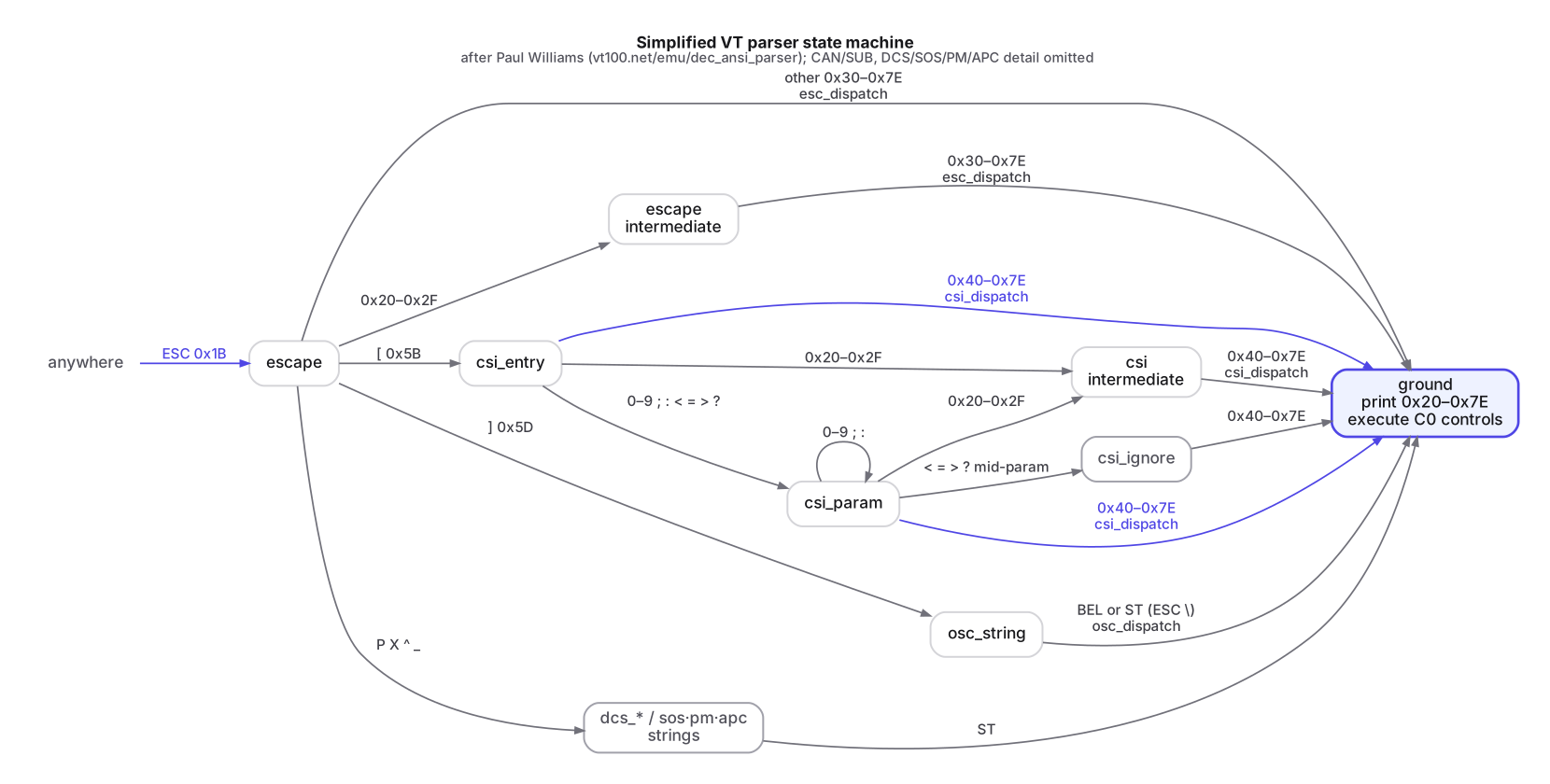
In Rust this layer is the vte crate from the Alacritty project, whose parser is based on Williams' state machine. It deliberately stops at turning bytes into callbacks. It does not know what "erase in line" means.
Stage 2: the grid, where the semantics live
The meaning of each action is where most of the work is. The visible screen is a rows × columns array of cells. Each cell holds a character plus attributes (foreground, background, bold, underline, inverse, wide-character flags, …). Around it sit the cursor position and its saved copy, the set of active modes, scrolling margins, tab stops, the alternate screen, and scrollback history. The subtle rules are the ones applications notice:
- After
DECSTBMsets a scrolling region, a line feed on its bottom margin scrolls only that region. - The alternate screen has no scrollback.
- Writing in the last column leaves the cursor in a "pending wrap" state. The wrap happens only when the next printable character arrives.
- A double-width character occupies two cells. Overwriting either half must clear the other.
Whether tmux, vim and htop draw correctly depends on these details. Writing a parser takes an afternoon. Getting the grid semantics right takes years of comparing against xterm and test suites such as vttest.
That is why MistTerm does not implement them itself. alacritty_terminal packages the parser, grid and semantics from the Alacritty terminal as a library. MistTerm's adapter (src/terminal/alacritty.rs) feeds it bytes in one line:
pub fn feed(&mut self, data: &[u8]) {
    if !data.is_empty() {
        self.content_epoch = self.content_epoch.wrapping_add(1);
    }
    self.parser.advance(&mut self.term, data);
}
parser is an alacritty_terminal::vte::ansi::Processor and term is a Term. advance consumes a whole chunk and keeps any half-finished sequence for the next call. content_epoch is MistTerm's own counter. The UI compares it between frames and skips re-layout when nothing changed.
Mode queries go straight to Term. For example, this is how the paste code knows whether the remote program has asked for bracketed paste:
/// Whether the remote program enabled bracketed paste (DECSET 2004; bash/zsh/vim do).
pub fn is_bracketed_paste(&self) -> bool {
    self.term
        .mode()
        .contains(alacritty_terminal::term::TermMode::BRACKETED_PASTE)
}
The grid size must match the remote PTY. When the window is resized, the local Term is resized and the server is told through the SSH window-change channel request (RFC 4254 §6.7; request_pty_size in the ssh2 crate). Otherwise remote programs keep wrapping at the old width.
Stage 3: drawing the grid
Alacritty itself renders glyphs with OpenGL. MistTerm is a full desktop application with side panels, an SFTP browser and dialogs, built on egui (an immediate-mode GUI) with the wgpu backend. So the terminal area is drawn with egui's text layout too.

For each visible row, cells are converted into an egui LayoutJob. Consecutive cells with identical styling are merged into one run, so the layout engine handles a few dozen text segments instead of thousands of single characters:
let same_run = |a: &TextFormat, b: &TextFormat| {
    a.color == b.color
        && a.extra_letter_spacing == b.extra_letter_spacing
        && a.line_height == b.line_height
        && a.font_id == b.font_id
};
// …
for (ch, color, _bg, flags) in row {
    if flags.intersects(wide_spacer) {
        flush_run(&mut job, &mut run_text, &mut run_fmt);
        job.append("\u{200b}", 0.0, cell_fmt(color, 0.0));
        continue;
    }
    let spacing = if flags.contains(Flags::WIDE_CHAR) { cell_w.max(0.0) } else { 0.0 };
    // same format as the current run → push; otherwise flush and start a new run
}
Two details here exist because of CJK text:
- Spacer cells. A wide character is stored as the character itself (flagged
WIDE_CHAR) followed by a spacer cell (WIDE_CHAR_SPACER). The spacer must not draw anything, but every row has to keep the same number of cells. MistTerm emits a zero-width space for it. - Forcing the advance width. A monospace font's CJK glyph is not guaranteed to be exactly twice the width of its ASCII glyphs. Laid out naively, the error accumulates along the line and the text drifts away from the cursor. Adding
extra_letter_spacingto wide characters forces each one to occupy exactly two cell widths.
Backgrounds are handled separately:
// Glyph layer background is always transparent; ANSI and selection backgrounds are
// painted by the UI, so egui's background expansion can't overlap adjacent lines.
let cell_fmt = |color: Color32, extra_spacing: f32| TextFormat {
    font_id: FontId::monospace(font_size),
    color,
    background: Color32::TRANSPARENT,
    line_height: Some(line_height),
    extra_letter_spacing: extra_spacing,
    valign: egui::Align::BOTTOM,
    ..Default::default()
};
A text engine paints a "background color" around each glyph's bounding box, which can bleed into neighboring lines. A terminal needs solid blocks aligned exactly to the cell grid. So MistTerm paints background rectangles itself from grid coordinates, and the text layer only draws foreground glyphs.
What is left to build
With the emulator core borrowed, what remains is the glue: where the bytes come from, where keystrokes go, when to repaint, and selection, search and scrollback in the GUI. The next article starts with where the bytes come from: the SSH channel, the remote PTY and flow control.
Summary
- A terminal and its program share only a byte stream. Control sequences follow ECMA-48 and xterm conventions, and
$TERMtells the program which dialect to speak. - Parsing is a resumable state machine (Williams' model, implemented by
vte). - The grid carries the hard semantics: margins, wrap state, modes, wide characters, alternate screen. MistTerm does not reimplement that layer; it uses
alacritty_terminal. - Rendering into a general GUI needs care: merge runs, give wide characters explicit spacing, and paint backgrounds per cell.
FAQ
What is the difference between the parser and the grid in a terminal emulator?
The parser only turns bytes into actions such as "print a character" or "dispatch a CSI sequence". The grid gives those actions their meaning: it holds the character cells, the cursor, scrolling margins, modes and the alternate screen.
What does TERM=xterm-256color do?
It tells programs on the server which terminal type to assume. They look the name up in the terminfo database to decide which control sequences to emit. MistTerm requests a PTY with that terminal type.
Why do CJK characters drift out of alignment in some terminals?
A monospace font's CJK glyph is not guaranteed to be exactly twice as wide as its ASCII glyphs, so small errors accumulate along a line. MistTerm forces each wide character to occupy exactly two cell widths.
Why does vim give the screen back when it exits?
It switches to the alternate screen with DEC private mode 1049 and switches back on exit. The alternate screen has no scrollback.
Series index · Part 2 →