SSH Flow Control, and Why an SSH Client Must Keep Reading While It Writes
Part 2 of "Building an SSH Terminal". Code excerpts are from MistTerm v1.2.26, an open-source (AGPL) SSH terminal client by MistLab; they are trimmed, and source comments are translated from Chinese.
TL;DR
SSH flow control gives each direction of each channel a window: the number of bytes the sender may still send before the receiver grants more with SSH_MSG_CHANNEL_WINDOW_ADJUST (RFC 4254 §5.2). When the send window is zero, the client must keep reading the server's output. Otherwise it and the remote program can wait on each other forever. Keep network I/O off the GUI thread, and bound every wait.
Part 1 treated the terminal as a pipe that hands bytes to a parser. Those bytes come from, and keystrokes go to, an SSH channel on a server PTY. Two properties of that path decide how an interactive client is built: the channel is flow-controlled, and the GUI thread must never wait on the network.
The data path
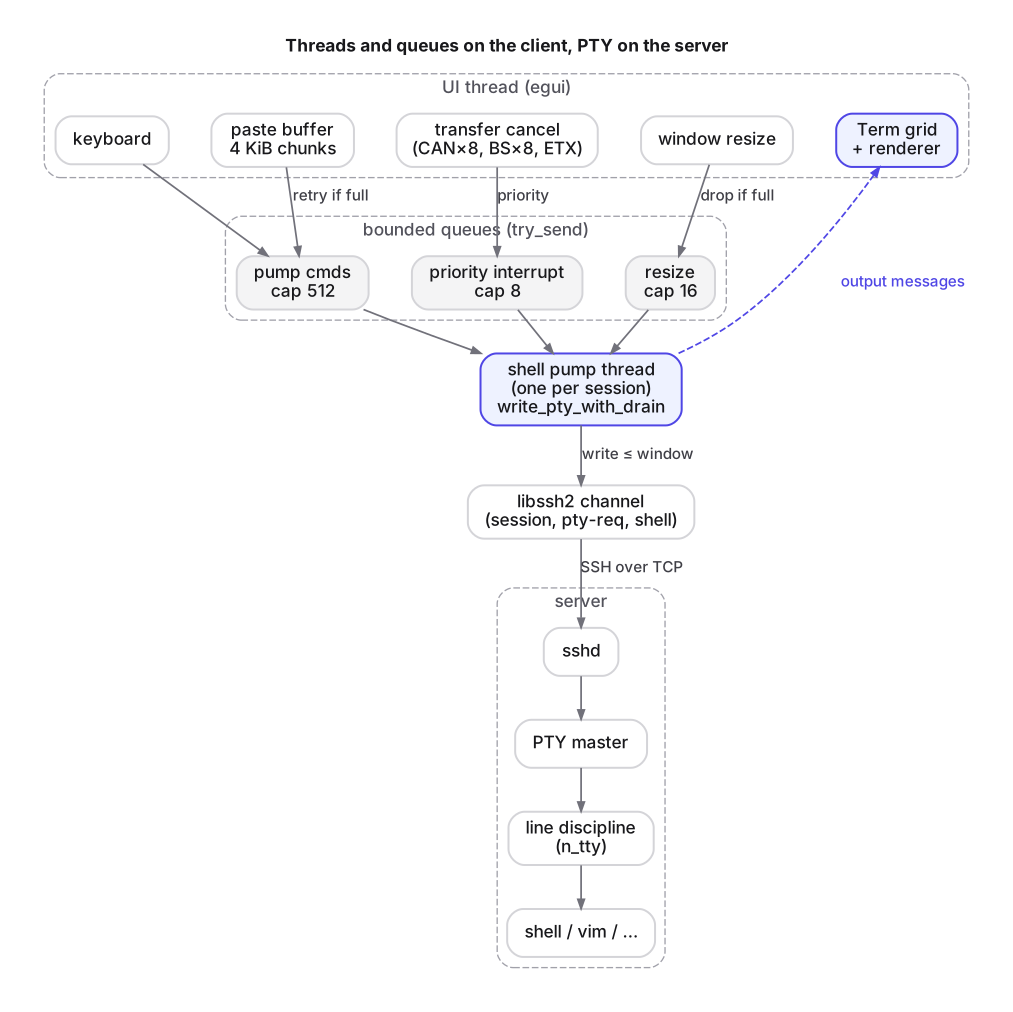
When you type l, the UI encodes the key and hands the bytes to the session layer. The SSH library encrypts them into an SSH_MSG_CHANNEL_DATA message (RFC 4254 §5.2). On the server, sshd writes the payload into the master side of a pseudo-terminal. The line discipline in the kernel's tty layer processes it (echo, line editing in canonical mode, signals such as Ctrl+C → SIGINT), and the shell reads from the slave side. Output takes the same path back.
Setting up that path takes three channel requests, all defined in RFC 4254. pty-req (§6.2) carries the terminal type, the size in characters and pixels, and encoded terminal modes. Optional env requests (§6.4) follow; Part 4 covers them. Finally shell (§6.5) starts the user's login shell. Resizing later uses window-change (§6.7). Despite the name, "window" there means the terminal window. It has nothing to do with the flow-control window below.
How does the SSH channel window work?
SSH multiplexes many channels over one TCP connection. To stop one fast channel from swamping the connection or the peer's memory, RFC 4254 §5.2 gives each direction of each channel a window: the number of bytes the sender may still transmit. Sending data consumes window. The receiver adds window back with SSH_MSG_CHANNEL_WINDOW_ADJUST after it has consumed data. When the window reaches zero, the sender must stop until an adjust arrives.
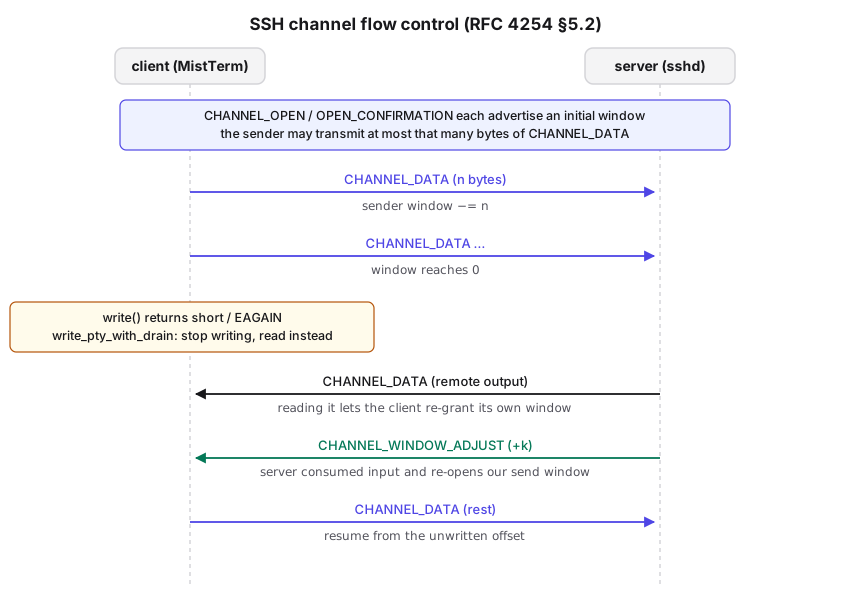
For a terminal, the interesting case is a large write: a big paste, or a file upload streamed through the terminal (Part 5). The client keeps writing until its send window is exhausted and then has to wait. What it does while waiting matters.
The server only re-opens the client's window after its side has consumed input, which means the remote program has to be reading. Interactive programs are often busy writing at the same time: a shell echoing the pasted text, or a progress display. If the client is not reading the server's output, the client never re-grants window in the other direction. The server stops sending, the remote program blocks on its own write(), stops reading its input, and the client's send window stays at zero. Neither side can make progress. A writer has to keep reading.
Avoiding the write deadlock: write with drain
MistTerm puts this rule in one function used for all large PTY writes, write_pty_with_drain in src/ssh/manager.rs. The session runs in non-blocking mode (sess.set_blocking(false)), so a write either makes progress or returns immediately. The core of the loop:
const MAX_NO_PROGRESS: usize = 6_000;   // × 150µs sleep ≈ 0.9 s without progress → error
const CHUNK_CEIL: usize = 256 * 1024;

while !rest.is_empty() {
    let len_before = rest.len();
    let win = channel.write_window().remaining as usize;
    if win == 0 {
        // no send window: read output instead, so the peer can make progress
        Self::pump_channel_reads(channel, read_buffer, message_tx, session_id, upload_bypass, None)?;
    } else {
        let chunk = rest.len().min(win).min(CHUNK_CEIL).max(1);
        match channel.write(&rest[..chunk]) {
            Ok(0) => { /* drain reads */ }
            Ok(n) => {
                rest = &rest[n..];
                if !rest.is_empty() { /* drain reads between chunks */ }
            }
            Err(e) if Self::is_retryable_write_error(&e) => { /* drain reads */ }
            Err(e) => return Err(e),
        }
    }
    if rest.len() < len_before {
        no_progress = 0;
    } else {
        no_progress += 1;
        if no_progress > MAX_NO_PROGRESS { return Err(/* TimedOut */); }
        thread::sleep(Duration::from_micros(150));
    }
}
(The real code maps a closed channel to ConnectionAborted at each drain point and handles a library return value larger than the request. These are elided here.)
Three design choices are visible:
- Never write more than the window. The chunk size is capped by
write_window().remainingand by a fixed ceiling, so a write call never has more queued than the protocol allows. - Read whenever writing cannot proceed. A zero window, a zero-byte write and a would-block error all lead to
pump_channel_reads. Output is forwarded to the terminal as it arrives, so the window in the other direction keeps flowing. - Bound the wait. The no-progress counter only grows when a whole iteration moved no bytes. After about 0.9 s of zero progress the write fails and returns control. Without that, a dead peer would hang the session thread forever.
Keep the network off the UI thread
The second rule concerns threads. egui is an immediate-mode GUI: the UI thread redraws every frame, and any blocking call on that thread freezes the window. SSH I/O blocks by nature. A write can sit in the drain loop above, and a library call can wait on the socket.
MistTerm gives each interactive session a dedicated OS thread, the shell pump, which alone owns the channel. The UI communicates with it only through bounded queues:
let (pump_tx, pump_rx) = sync_channel::<ShellPumpCommand>(SHELL_PUMP_QUEUE_CAP); // 512
let (interrupt_tx, interrupt_rx) = sync_channel::<Vec<u8>>(8);
let (resize_tx, resize_rx) = sync_channel::<(u32, u32)>(RESIZE_QUEUE_CAP);       // 16
Each loop iteration of the pump thread first drains the priority queue, then applies pending resizes, then waits up to 8 ms for one command. On timeout it services keepalive and reads output. Adjacent keystroke commands are merged into one write of up to 32 KiB before being sent, so a burst of typing costs one queue entry rather than hundreds.
The UI side never blocks on these queues. Every enqueue uses try_send:
/// Uses `try_send` (non-blocking): if the pump thread is stuck in
/// `write_pty_with_drain` or a long read and the queue is full, the caller
/// (the UI thread) is not blocked; an error is returned so the upper layer
/// can drop or degrade.
fn pump_send(&self, cmd: ShellPumpCommand) -> Result<(), String> {
    self.pump_tx.try_send(cmd).map_err(/* "shell pump queue full (cap=512) …" */)
}
This is a trade-off. A blocking send never loses input, but it ties UI responsiveness to the network. try_send keeps the window responsive and, under extreme backlog, reports a dropped command instead. With a 512-entry queue and keystroke merging, a full queue means the session is already effectively stalled.
The 8-entry priority queue exists for control bytes that must jump the queue, through send_priority_interrupt. In v1.2.26 its caller is the ZMODEM cancel path (Part 5). It sends eight CAN bytes, eight backspaces and Ctrl+C, so an aborted transfer is cancelled ahead of whatever file data is still queued.
Summary
- An SSH shell is three RFC 4254 requests (pty-req, env, shell) plus window-change for resizes.
- Channel data is window-limited in both directions. A client that only writes during a large transfer can deadlock with the remote program. Read whenever the write cannot proceed.
- Bound every wait, and keep all network I/O on a dedicated thread. The GUI talks to it through bounded, non-blocking queues.
Next: paste. Same big write, different ways it fails — bracketed paste, and the 4095-byte line.
FAQ
What is the SSH channel window?
A per-channel, per-direction count of bytes the sender may still transmit (RFC 4254 §5.2). Sending consumes it, and the receiver adds to it with SSH_MSG_CHANNEL_WINDOW_ADJUST after consuming data.
Why can a large paste hang an SSH session?
If the client only writes, it stops reading the server's output. The server stops sending, the remote program blocks on its own output and stops reading input, and the client's send window stays at zero.
Is the SSH window-change request related to flow control?
No. window-change (RFC 4254 §6.7) reports a new terminal size. The flow-control window is unrelated.
Which channel requests start an interactive SSH shell?
pty-req, optional env requests, then shell, all defined in RFC 4254.
← Part 1 · Series index · Part 3 →