Finding ZMODEM in a Terminal Byte Stream: How `rz`/`sz` Works Inside an SSH Client
Part 5 of "Building an SSH Terminal". Code excerpts are from MistTerm v1.2.26, an open-source (AGPL) SSH terminal client by MistLab; they are trimmed, and source comments are translated from Chinese.
TL;DR
ZMODEM, implemented by the lrzsz tools rz and sz, is a file-transfer protocol that runs inside the terminal session itself, so it works over SSH without a second connection. The client has to find ZMODEM frame headers in ordinary output, then route the PTY stream to the protocol instead of the emulator. MistTerm only starts a transfer when it sees a valid header and the user has just run sz or rz.
On many production servers the quickest way to move a file is still sz file.tar.gz to download it, or rz to upload one. These are the lrzsz tools, implementing ZMODEM, a file-transfer protocol from 1986 designed for modems and serial lines. It works over SSH because it never needs a separate connection. It runs inside the terminal session, over the same PTY bytes as everything else.
That is also what makes it hard for a terminal. The client has to spot the start of a transfer inside a stream that is otherwise text for the screen. It then has to take the stream away from the emulator, run a protocol over it, and hand it back cleanly.
How does ZMODEM work? Just enough of the protocol
The protocol is described in Chuck Forsberg's ZMODEM specification. The parts that matter here:
- Frames start with a header. Header bytes include
ZPAD(*) andZDLE(0x18, the same value as ASCII CAN), followed by a format byte.Bis a hex header, encoded entirely in printable hex digits and ended by CR LF.Ais binary with CRC-16,Cis binary with CRC-32. A hex header looks like**ZDLEB+ two hex digits for the frame type + eight for flags + four for the CRC. Binary headers formally use a singleZPAD. - Frame types relevant to startup:
ZRQINIT(type 0), sent by the sender to ask for a receiver; andZRINIT(type 1), sent by the receiver to say it is ready and to state its capabilities. - ZDLE escaping. In binary data, ZDLE and certain control characters are escaped, so a frame survives links that interpret XON/XOFF.
- Cancellation. Five or more consecutive CAN (0x18) bytes abort a session.
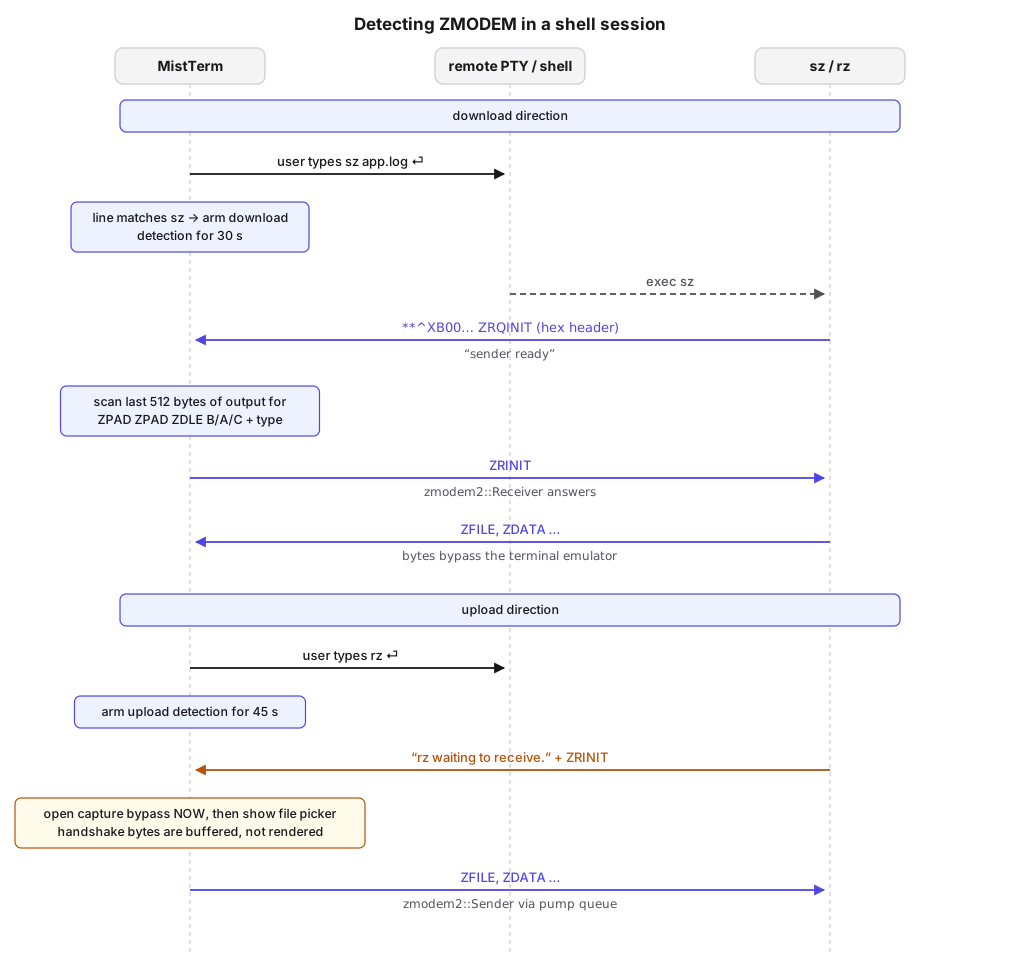
The roles follow from the command. sz on the server is the sender: it starts by printing rz\r (a hint to terminals that auto-start a receiver) and a hex ZRQINIT. The client must become the receiver and answer with ZRINIT. rz on the server is the receiver: it announces itself with ZRINIT (lrzsz also prints the text "rz waiting to receive."). The client must become the sender and start with a file header (ZFILE).
How does a terminal detect rz/sz? Not mistaking text for a frame
A terminal that turns into a file receiver whenever **\x18B00 scrolls past would misfire on cat-ing a binary file, on log output, or on someone viewing this article over SSH. MistTerm combines three signals.
Scan a bounded tail, not just the latest read. A header can be split across reads (Part 2). Output from the session is appended to a detection tail, capped at the last 512 bytes, and the scanner runs over that window:
fn push_zmodem_detect_tail(&mut self, data: &[u8]) {
    const TAIL_CAP: usize = 512;
    self.zmodem_pty_detect_tail.extend_from_slice(data);
    if self.zmodem_pty_detect_tail.len() > TAIL_CAP {
        let drop = self.zmodem_pty_detect_tail.len() - TAIL_CAP;
        self.zmodem_pty_detect_tail.drain(..drop);
    }
}
Parse headers structurally. The scanners check the full prefix (ZPAD ZPAD ZDLE + format byte) and decode the type digits. They accept the variants found in the wild, such as a parity-stripped ZPAD (0x80), the single- and double-ZPAD binary forms, and an ASCII **B… form without ZDLE, which the code's comments attribute to the Windows build of lrzsz:
fn hex_scan_for_type(data: &[u8], want: u8) -> bool {
    // at least 6 bytes: `** ZDLE 'B' HH` (HH = frame type as a hex pair)
    for i in 0..data.len().saturating_sub(5) {
        if !is_zpad(data[i]) || !is_zpad(data[i + 1]) || data[i + 2] != zmodem::ZDLE {
            continue;
        }
        let hb = data[i + 3];
        if hb != zmodem::ZHEX && hb != b'B' && hb != b'b' { continue; }
        if let Some(t) = hex_pair(data[i + 4], data[i + 5]) {
            if t == want { return true; }
        }
    }
    false
}
Require intent. A header alone does not start a download. The client also tracks the command line the user submits. If its first word is sz/lsz (any path, .exe allowed), download detection is armed for 30 seconds. Uploads work the same way with rz/lrz, armed for 45 seconds:
pub fn is_sz_shell_command(line: &str) -> bool {
    let base = shell_word_basename(first_shell_word(line));
    let lower = base.to_ascii_lowercase();
    matches!(lower.as_str(), "sz" | "lsz" | "sz.exe" | "lsz.exe")
}
A download starts only when a ZRQINIT is seen and that window is open. echo sz and where rz do not arm it. An upload starts on any of: rz's own prompt text ("rz waiting to receive.", "Awaiting rz", "rz rz rz"), the Windows ASCII **B01 form, or a header seen while an upload is expected. The text check is deliberately specific to lrzsz's messages. The header check is gated by intent.
A naming note for readers of the source: some comments in this code path say that rz "sends ZRQINIT". By the specification, the receiver sends ZRINIT, and ZRQINIT comes from the sender. We list this in the review notes for the series.
Taking over the stream
Once a transfer starts, PTY output belongs to the protocol. Feeding ZMODEM frames to the terminal emulator would put binary garbage on screen and, worse, could be read as control sequences. The handover has a few constraints:
-
One reader. The shell pump thread owns the SSH channel (Part 2). A transfer must not open a second reader, which would race for bytes. Instead the pump forwards PTY output to the ZMODEM engine through a bypass:
Uploads (local sz → remote rz): ZMODEM frames on the PTY can only reach this point through the SSH pump thread; they must be bypassed to the transfer engine, and the Channel must not be read again from another thread.
-
Capture before the file dialog. For an upload, the remote
rzis already talking when the user is still choosing a file. MistTerm starts capturing the handshake (begin_rz_handshake_capture) as soon as it is detected, before opening the file picker. Otherwise the receiver'sZRINITis consumed by the emulator, and the sender waits for a header that already went by. - Bounded buffering. While waiting for the first header, or while frames are being reassembled, incoming bytes are buffered up to 512 KiB (
RX_INCOMING_CAP). Past that the receive is aborted rather than growing without bound.
The protocol work itself (frame encoding, CRCs, ZDLE escaping, the ZRPOS/ZACK exchange) is done by the zmodem2 crate, vendored in the repository. For comparison testing, setting MISTTERM_ZMODEM_USE_EXTERNAL_SZ=1 makes MistTerm drive a local sz binary instead of the built-in sender.
Two safety details
The remote picks the file name, so treat it as untrusted. The file name arrives in the data subpacket that follows the sender's ZFILE header. A hostile or buggy server could send ../../.bashrc or an absolute path. MistTerm keeps only the final path component and never overwrites:
fn disambiguate_download_path(download_dir: &Path, raw_name: &[u8]) -> Result<PathBuf, String> {
    let base = String::from_utf8_lossy(raw_name);
    let only = Path::new(base.trim())
        .file_name()
        .and_then(|s| s.to_str())
        .filter(|s| !s.is_empty())
        .unwrap_or("zmodem.bin");
    let mut file_path = download_dir.join(only);
    let mut counter = 1u32;
    while file_path.exists() {
        // name_1.ext, name_2.ext, …
    }
    Ok(file_path)
}
Path::file_name returns None for names ending in .., which then fall back to zmodem.bin.
Cancel must jump the queue. When the user cancels an upload, the session queue may still hold file data. A single Ctrl+C is not guaranteed to stop rz/sz, because while they run the PTY is in raw mode. The cancel goes through the priority queue described in Part 2:
// In ZMODEM protocol state a single Ctrl+C may not be recognized by the remote
// rz/sz; send the CAN sequence at high priority, then ETX.
let cancel = vec![
    0x18, 0x18, 0x18, 0x18, 0x18, 0x18, 0x18, 0x18, // CAN x8
    0x08, 0x08, 0x08, 0x08, 0x08, 0x08, 0x08, 0x08, // erase noise
    0x03, // ETX
];
handle.send_priority_interrupt(cancel)
Eight CANs exceed the spec's five-CAN abort threshold. The backspaces mirror lrzsz's own cancel string (CANs followed by backspaces), erasing the CANs if the line ends up back at a shell. The final ETX covers the case where the remote program has already exited.
Summary
- ZMODEM runs inside the terminal stream. The client has to find frame headers within ordinary output.
- Detection needs a bounded scan window, a real header parse, and proof the user just submitted
sz/rz. - During a transfer, the PTY stream must bypass the emulator through the single channel owner, with bounded buffers.
- Treat the sender's file name as untrusted, and send cancellation ahead of queued data.
FAQ
How does rz/sz work over SSH?
ZMODEM runs inside the terminal session over the same PTY bytes as normal output, so no separate connection is needed. The terminal must detect the start of a transfer and take the stream over.
What do ZRQINIT and ZRINIT mean?
ZRQINIT (frame type 0) is sent by the sender to ask for a receiver. ZRINIT (frame type 1) is sent by the receiver to say it is ready and to state its capabilities.
Why doesn't MistTerm start a download whenever it sees a ZMODEM header?
Headers can appear in ordinary output, such as a binary file printed with cat. MistTerm also requires that the user has just submitted an sz or rz command.
How do you cancel a ZMODEM transfer?
Five or more consecutive CAN (0x18) bytes abort a session. MistTerm sends eight, ahead of any queued file data.
← Part 4 · Series index · Part 6 →