Command Auditing in an SSH Terminal: What the Client Can See, and What Only the Server Can Enforce
Part 6 of "Building an SSH Terminal". Code excerpts are from MistTerm v1.2.26, an open-source (AGPL) SSH terminal client by MistLab and from the server-side agent installer in the Mist server repository; they are trimmed, and comments are translated from Chinese.
TL;DR
A terminal sees keystrokes, not the command the shell finally runs. Line editing, alias and variable expansion, scripts and other SSH clients all bypass it. Client-side command checks are therefore advisory. Enforcement has to happen on the server, where processes start, for example by wrapping commands with sshd's ForceCommand. In-band markers in terminal output can be forged and should only be used for display.
Teams that share production servers often want a guard rail: warn before rm -rf /, require a second look before DROP DATABASE, keep a record of what was run. The obvious place to build that seems to be the terminal, because it sees every keystroke. It is a useful place to advise and the wrong place to enforce. MistTerm splits that: a local check that only warns, and enforcement on the server, where the process starts.
Why a terminal cannot know which command will run
Recall Parts 1 and 2. A terminal sends bytes and receives bytes. It does not see the remote shell's command line. It sees keystrokes going out and echo coming back. The command that actually runs differs from the keystrokes in many ways the terminal cannot model:
- Line editing. Cursor movement, Tab completion, history recall (
↑,Ctrl-R,!!), and readline or zsh widgets all change the line without any one-to-one mapping to keys. - Expansion. Aliases, functions, variables, globbing and command substitution happen inside the shell.
$(echo rm) -rf xcontains norm -rfthe terminal could match. - Indirection. Scripts,
cron,sudo -s,tmux, a nestedsshhop, or a program reading commands from a file all execute commands that never pass through the terminal's input path. - Other clients. Anyone can connect with plain OpenSSH and bypass a terminal-side rule entirely.
So a client-side check is a best-effort hint for the person at the keyboard. Enforcement has to happen where the command executes: on the server, by the component that starts processes. MistTerm's design document for the team features states it the same way. The server-side check is the authority, and the local engine is a hint.
The client side: a local rule engine
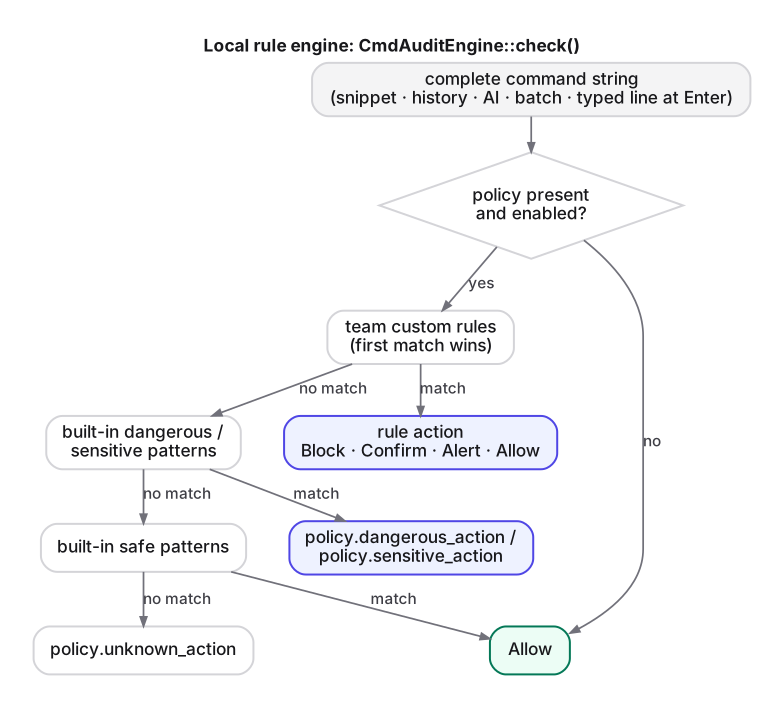
MistTerm's client has a rule engine, CmdAuditEngine, whose policy is synchronized from the team service (/v1/teams/{team_id}/command-audit/sync, refreshed every 300 seconds). It is active only when a team policy is enabled. The evaluation order is fixed, and the first match wins:
// src/core/cmd_audit.rs — CmdAuditEngine::check (outline)
pub fn check(&self, command: &str) -> CmdAuditResult {
    let cmd = command.trim();
    if cmd.is_empty() || !self.is_active() { return allow_result(); }
    // 1. team custom rules, in order (an Allow rule short-circuits)
    // 2. built-in "read-dangerous"  → policy.dangerous_action
    // 3. built-in "read-sensitive"  → policy.sensitive_action
    // 4. built-in dangerous         → policy.dangerous_action
    // 5. built-in read-safe / safe  → allow
    // 6. otherwise                  → policy.unknown_action
}
The default policy maps dangerous matches to Block, sensitive matches to Confirm and unknown commands to Allow. Teams can change all three.
The engine is consulted wherever the client itself originates a command: snippets and saved commands sent to a pane, batch execution across hosts, and commands proposed by the built-in AI assistant. In those cases the client knows the exact text it is about to send, and the check is precise.
Typed commands: gating Enter
Commands typed by hand are the hard case. In v1.2.26 MistTerm checks them at the moment Enter is pressed. When a policy is active, the Enter key does not immediately send \r. The client first reconstructs the line from the keys it has sent since the last Enter, then runs the check:
/// Keyboard Enter: if a policy is active and the local line is trustworthy,
/// hand it to the host for auditing first; otherwise send `\r` as before.
fn submit_enter_key(&mut self) {
    if self.typed_enter_request.is_some() { return; } // previous Enter still being audited
    if let Some(line) = self.typed_enter_gate_line() {
        self.typed_enter_request = Some(line);
        return;
    }
    self.release_typed_enter(); // sends "\r"
}
The reconstruction is approximate on purpose, and the code says so by declining to gate when the line cannot be trusted:
fn typed_enter_gate_line(&self) -> Option<String> {
    if !self.typed_enter_gate || !self.connected { return None; }
    if self.terminal.is_alt_screen() || self.lrzsz.is_active() || self.transfer_progress.is_some() {
        return None; // full-screen apps (vim, less, …) and file transfers
    }
    let line = self.typed_line_buffer.trim();
    if line.is_empty() { return None; }
    if Self::looks_like_secret_prompt(&self.terminal.cursor_line_text()) {
        return None; // "password", "passphrase", … — never treat a secret as a command
    }
    Some(line.to_string())
}
The local buffer tracks printable input, Backspace, Ctrl-U and Ctrl-C (clear) and Ctrl-W (delete word). It does not model cursor movement, completion or history. For example, a line recalled with ↑ leaves the local buffer empty, so Enter is passed through rather than blocked. The source comment warns against the alternative: blocking whenever the buffer looked wrong would produce a terminal that "can move left and right but cannot press Enter".
If the check blocks, or the user declines a confirmation, the characters are already on the remote command line, because they were sent key by key. The client sends Ctrl-U (0x15) to clear the remote line and resets its own buffer:
pub fn discard_typed_line(&mut self) {
    self.typed_enter_request = None;
    self.typed_line_buffer.clear();
    self.pty_outbound_line_buffer.clear();
    let _ = self.send_pty_input(&[0x15]); // kill-line on the remote side
}
Ctrl-U is the default line-kill for both the kernel's canonical mode and readline. It is still a convention: a remote program with different key bindings would behave differently.
Where should command auditing be enforced? On the server
The Mist server repository ships an agent installer for team servers (deploy/agent/install.sh, installed with a one-line curl … | sudo bash). It is plain bash and curl, with no daemon. It registers the machine and installs an sshd ForceCommand wrapper. With ForceCommand, sshd runs the wrapper instead of whatever the client asked for, and passes the requested command in SSH_ORIGINAL_COMMAND.
What the wrapper does, read directly from the installer:
CMD="${SSH_ORIGINAL_COMMAND:-}"
LOGIN_SHELL="${SHELL:-/bin/sh}"

# Interactive login (no command): give a normal login shell; we must not exit,
# or people could not log in at all
if [ -z "$CMD" ]; then exec "$LOGIN_SHELL" -l; fi

# sftp subsystem is not a shell command: hand off to sftp-server
# …

# If the config is unreadable, do not audit; run as usual. The config holds this
# machine's secret and is readable only by root, so currently only the root
# account's commands are audited.
[ -r /etc/mist-agent/config ] && . /etc/mist-agent/config 2>/dev/null || exec "$LOGIN_SHELL" -c "$CMD"

RESP=$(curl -sS -m 5 -X POST "$MIST_API/server/command-audit/check" …)
Then:
- If the service cannot be reached, the command runs, with a stderr notice that it was not checked and will not be recorded. That is fail-open.
- If the result is
blockorconfirm(orallowed: false), the command does not run, and a blocked record is sent. Forconfirm, the message explains that a plainssh host cmdhas no way to confirm interactively. - Otherwise the command runs and the result is reported.
Taken together, the default installer enforces policy on non-interactive commands (ssh host 'cmd', automation, CI) for root. An interactive login gets an ordinary login shell, and the wrapper sees nothing typed into it afterwards. That is an inherent limit of ForceCommand: it intercepts the session's initial command, not the commands a shell later runs.
The check endpoint (POST /v1/server/command-audit/check) returns allowed, action, the matching rules and a record id. It does not issue any approval token.
Interactive shells: an optional hook
Checking commands inside an interactive bash requires a hook inside bash. The MistTerm repository contains an optional script, scripts/fix-mist-agent-interactive.py, that installs one. It is not part of the default agent installer. It uses bash's DEBUG trap with extdebug:
shopt -s extdebug
trap mist_audit_preexec DEBUG
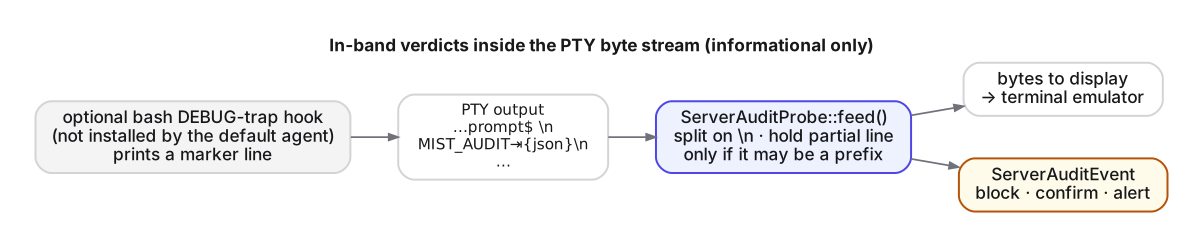
With extdebug set, if the DEBUG trap returns a non-zero status, bash skips the command about to run (bash manual, shopt / extdebug). The hook posts the command to the same check endpoint, with a 1.5 s timeout and fail-open, and prints a marker line for the client:
MIST_AUDIT {"v":1,"action":"block","message":"…","rule":"…","command":"…"}
On block it returns 1, so bash skips the command. On confirm it prints the marker and returns 0, which means the command runs. The marker only lets the client show the rule to the user. A DEBUG trap is a convenience layer, not a security boundary: the user controls their own shell and can remove the trap, and other shells (zsh, fish, sh) are not covered.
Parsing an in-band marker
On the client, ServerAuditProbe sits between the session and the emulator. It holds back an incomplete line that might be the start of a marker, strips complete MIST_AUDIT lines from the display, and turns them into dialog events:
/// Feed one chunk of PTY data; returns bytes to display and parsed events.
pub fn feed(&mut self, chunk: &[u8]) -> (Vec<u8>, Vec<ServerAuditEvent>) {
    // for each complete line: parse_mist_audit_line → event, else pass through;
    // for a trailing partial line: hold it only if it could still become a marker
}
Holding back a partial line only when it could still become a marker matters for latency. The probe skips leading whitespace and escape sequences, and keeps bytes only if what remains is a prefix of MIST_AUDIT, or if the chunk ends inside an unfinished escape sequence. Ordinary echo goes straight to the screen.
An in-band marker shares the stream with everything else, so any output can contain one. cat a file with that line in it and the client will show a dialog. That is acceptable only because the marker carries no authority. The decision was already made on the server, and the dialog is informational.
One leftover in the client deserves mention. After a user confirms a server-side confirm, the client would first send MIST_AUDIT_APPROVE\t<token> if the marker carried a non-empty token field (src/ui/app.rs). The hook forwards a token only if the check response contains one, and the server's check response has no such field. So in current deployments that branch never runs. We note it so readers of the source do not take it as a working approval mechanism.
Summary
- A terminal sees keystrokes, not commands. Editing, expansion and indirection make terminal-side checks advisory by nature.
- MistTerm's client checks the commands it originates precisely, and typed commands approximately at Enter. When the local line is not trustworthy (alt screen, transfer, password prompt), it steps aside instead of guessing.
- Enforcement belongs on the server. The default agent wraps non-interactive commands for root via
ForceCommandand fails open if the service is unreachable. Interactive shells need an optional bash hook, which can block but does not hold aconfirm. - In-band markers are forgeable by any output. Use them for display, never for decisions.
FAQ
Can an SSH client reliably audit commands?
No. It sees keystrokes, not the final command, and other clients bypass it entirely. Client-side checks are best-effort hints.
Where should SSH command auditing be enforced?
On the server, where processes are started, for example by wrapping commands with sshd's ForceCommand.
Can in-band markers in terminal output be trusted?
No. Any program output can forge them. Use them for display, never for decisions.
← Part 5 · Series index · Part 7 →