An Auto-Updater That Doesn't Trust Its Download Server: minisign, Verify-Before-Parse and Rollback Protection
Part 7 of "Building an SSH Terminal". Code excerpts are from MistTerm v1.2.26, an open-source (AGPL) SSH terminal client by MistLab; they are trimmed, and source comments are translated from Chinese.
TL;DR
HTTPS authenticates the download server, not the update itself. A secure updater accepts an update only if it is signed by a key the client already ships. MistTerm signs a JSON manifest with minisign (Ed25519), verifies the signature before parsing anything, binds each binary to the manifest by SHA-256, and remembers the highest verified version to reject replayed old manifests.
An SSH client holds the keys to its users' servers. That makes its update channel a high-value target. Anyone who can make the client install a binary of their choice owns every machine the user connects to. HTTPS alone does not cover this. It authenticates the server you download from, not the content. A compromised CDN account, a hijacked release page or a mirror operator can all serve a valid HTTPS response containing the wrong file.
The design goal is therefore: the client should accept an update only if it was signed by a key the client already ships, and it should treat everything it downloads as hostile until then. The client runs that in order: fetch with a size cap, verify the minisign signature, refuse an older manifest, check the asset hash, then install with a way back.
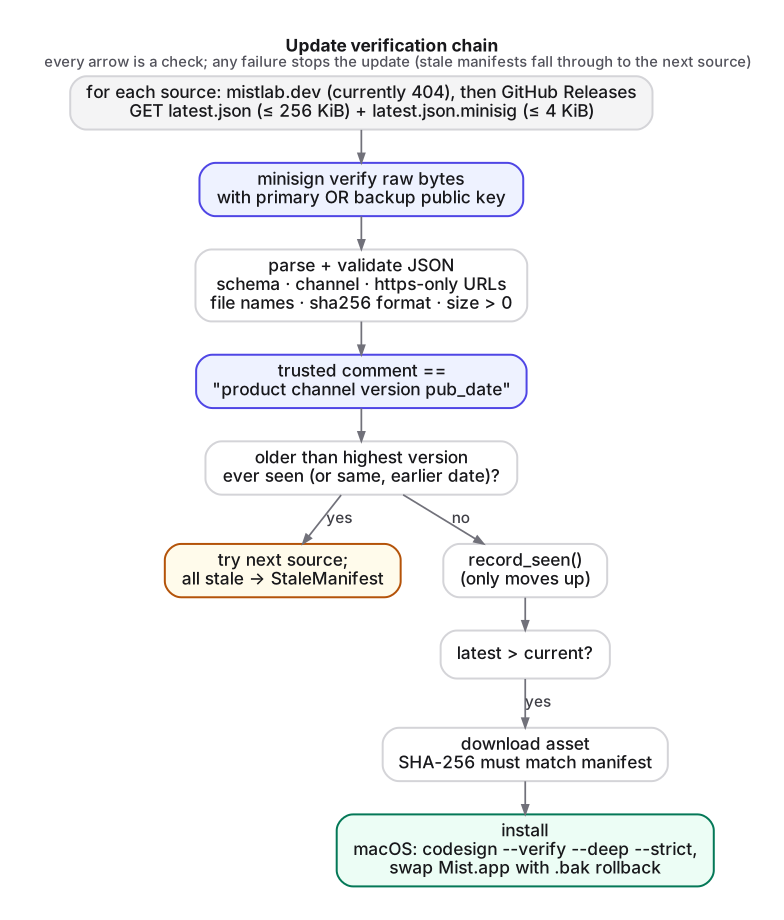
The manifest and its signature
Each release publishes a small JSON manifest, latest.json, plus a detached signature, latest.json.minisig. The manifest lists the version, publication date and one entry per platform asset, each with a file name, size and SHA-256. The v1.2.26 release manifest (the version these excerpts come from; later releases keep the same shape) has six assets: Linux x86_64 (GUI), static CLI builds for Linux x86_64 and aarch64, a Windows installer, a Windows portable build and a macOS universal app. The binaries themselves are not signed with minisign. They are bound to the signed manifest by their hashes.
Signatures use minisign, Frank Denis' tool built on Ed25519. Two properties of its format matter here:
- Prehashed signatures. Since minisign 0.8 the default signature algorithm (
ED) signs a BLAKE2b hash of the file. MistTerm accepts only that form (key.verify(data, &sig, false)disables the legacy non-prehashed mode). - Trusted comments. A minisign signature carries a "trusted comment" line, and a second, global signature covers the file signature together with that comment. Unlike the untrusted comment, it cannot be edited without the key.
MistTerm puts the release identity into the trusted comment, in the form product channel version pub_date. That v1.2.26 release's trusted comment is:
trusted comment: mistterm stable 1.2.26 2026-10-20T16:22:55Z
Anyone can check that independently with the public key in the repository:
$ minisign -V -p resources/update/minisign-primary.pub -m latest.json
Signature and comment signature verified
Trusted comment: mistterm stable 1.2.26 2026-10-20T16:22:55Z
Step 1: fetch with limits
The client knows two manifest locations, tried in order:
// src/core/updater/mod.rs
"https://mistlab.dev/downloads/mistterm/stable/latest.json",
"https://github.com/mistlab-dev/MistTerm/releases/latest/download/latest.json",
As of this writing the first URL returns HTTP 404. The release workflow's mirror job, which would publish there, is not implemented yet and is switched off. In practice every client gets its manifest from GitHub Releases. Because trust comes from the signature, not the host, adding or losing a source changes availability but not security.
Before parsing anything, the client caps what it is willing to download. The manifest may be at most 256 KiB and the signature at most 4 KiB:
let body = fetcher.get_small(url, MAX_MANIFEST_BYTES)?;   // 256 KiB
let sig  = fetcher.get_small(&sig_url, 4096)?;
Step 2: verify the signature before parsing
The order of the next two operations is the key design decision:
/// Verify first, then parse: JSON is parsed only after the signature checks out,
/// and the trusted comment must match the manifest contents.
pub fn verify_manifest(manifest_bytes: &[u8], signature_bytes: &[u8], keys: &TrustedKeys,
                       expected_channel: &str, allow_loopback_http: bool)
    -> Result<Manifest, UpdateError>
{
    let sig_text = std::str::from_utf8(signature_bytes).map_err(|_| UpdateError::BadSignature)?;
    let sig = keys.verify(manifest_bytes, sig_text)?;
    let manifest = Manifest::parse_and_validate(manifest_bytes, expected_channel, allow_loopback_http)?;
    if sig.trusted_comment().trim() != manifest.expected_trusted_comment() {
        return Err(UpdateError::InvalidManifest(/* "trusted comment … does not match manifest" */));
    }
    Ok(manifest)
}
Verifying first means the JSON parser and the validation code only ever run on bytes the publisher signed. A bug in parsing can no longer be triggered by an attacker who controls the download path.
The client compiles in two public keys, a primary and a backup. A signature from either one is accepted. That allows the signing key to be rotated, or a compromised key retired, with a client release that is still verifiable by the other key.
Validation after parsing is strict. It checks the schema version (an unknown one is reported as unsupported), product == "mistterm", the expected channel, a semver version and an RFC 3339 date. For each asset it checks a plain file name with no path separators, a 64-character hex SHA-256, a non-zero size, and https URLs only. Plain http to loopback is allowed only in a test build feature.
Why the trusted-comment check. A valid signature proves that the publisher signed these bytes at some point. The comment check proves the bytes are the release they claim to be. Release metadata lives in two places, the JSON and the signed comment, and they must agree.
Step 3: rollback protection, or refusing to go backwards
A signed manifest stays valid forever. An attacker who cannot forge signatures can still replay an old, genuinely signed manifest for a version with a known vulnerability. That is a rollback (or freeze) attack, one of the classic threats catalogued by The Update Framework (TUF).
MistTerm defends against it by remembering the highest version, and its publication date, ever seen in a verified manifest:
/// Is this manifest older than one we've seen (lower version, or same version
/// with an earlier publication date)?
pub fn is_stale(&self, version: &semver::Version, pub_date: Option<DateTime<Utc>>) -> bool {
    // … compare with highest_seen_version / highest_seen_pub_date
}

/// Record a verified manifest (only ever moves upward).
pub fn record_seen(&mut self, version: &semver::Version, pub_date: &str) { /* … */ }
A stale manifest from one source is skipped and the next source is tried. If every source returns a stale manifest, the result is a distinct StaleManifest error, not "up to date". An update is offered only if the manifest version is strictly greater than the running version, and downgrade is off by default (allow_downgrade: false).
Error reporting has its own small rule. When several sources fail, a signature or schema error is kept in preference to a later network error, because "the file was tampered with" is more useful to the user than "the backup host was unreachable".
This is not full TUF. There is no timestamp role, so a freeze attack that withholds new manifests is only limited by users noticing. It does close the cheap replay attack.
Step 4: download and check the asset
The platform asset is downloaded to a cache directory with a size limit taken from the manifest. Its SHA-256 is compared with the manifest entry before it is used. A cached file whose hash already matches is reused.
Unpacking is just as wary. The updater does not extract archives generically. It accepts only the specific program files it expects, as name or topdir/name, with normal path components only. Each extracted file is capped at 1 GiB, which guards against decompression bombs:
// Accept only `name` or `topdir/name`; no general extraction, which rules out
// path traversal at the root.
fn entry_basename_if_wanted<'a>(path: &Path, wanted: &[&'a str]) -> Option<&'a str> {
    let comps: Vec<_> = path.components().collect();
    if comps.is_empty() || comps.len() > 2 { return None; }
    if !comps.iter().all(|c| matches!(c, std::path::Component::Normal(_))) { return None; }
    let name = path.file_name()?.to_str()?;
    wanted.iter().copied().find(|w| *w == name)
}
Step 5: install, with a way back
Installation differs per platform, but each path keeps the previous version recoverable:
- Linux and Windows portable. The new binary is staged next to the old one and run once with
--version. This smoke test must finish within 20 seconds and print the expected version. Only then are the files swapped. Old files go into.mist-update-backup/. On Linux,rename()replaces the file atomically, and the running process keeps its old inode. On Windows a running.execannot be overwritten but can be renamed, so the old file is moved aside first. If any step fails, the files already swapped are put back. - Windows installer edition. The verified
setup.exeis launched silently as a separate process. It closes Mist and can relaunch it. - macOS. The update is a tarball containing only
Mist.app. It is unpacked with the system/usr/bin/tar, which preserves the bundle's symlinks and permissions. The result must passcodesign --verify --deep --strictbefore the old bundle is renamed to.bakand replaced. If the swap fails, the old bundle is restored.codesign --verifyconfirms the bundle's signature is intact, but it is not the root of trust. That role belongs to the minisign-signed hash checked in step 4.
Some installations are deliberately not self-updated. The updater tells the user what to do instead when MistTerm was built from source or installed by a package manager, when the install directory is not writable, when the host's glibc is older than the build requires, or when macOS has translocated the app. Gatekeeper's App Translocation runs quarantined apps from a randomized read-only path, so it cannot be replaced in place until it is moved to Applications.
The updater never restarts the application on its own. A completed install waits for the next launch. Setting MIST_DISABLE_UPDATE_CHECK=1 turns checking off entirely.
Keeping the keys honest at build time
A signature scheme is only as good as the keys compiled into the client. MistTerm's build.rs enforces three rules for official builds (MIST_DIST_CHANNEL=github-release):
panic!("the update-test feature must never be enabled in an official release build");
// … real public keys are required: a file still containing PLACEHOLDER fails the build
panic!("primary and backup update signing public keys must be different keys");
A release cannot ship with test keys, with placeholder keys, or with a "backup" key that is a copy of the primary. The release workflow (Part 8) then verifies its own signatures with minisign -V before publishing.
Summary
- HTTPS authenticates hosts, not content. Sign the release manifest with a key the client ships, and bind binaries to it by hash.
- Verify before parsing, cap every download, and validate every field. Bind the manifest's identity to the signed trusted comment.
- Remember the highest verified version to stop replayed old manifests, and never downgrade silently.
- Extract only expected files, test-run the new binary, keep a backup, and let the build refuse unsafe key configurations.
FAQ
Isn't HTTPS enough to secure software updates?
No. HTTPS authenticates the server you download from, not the content. A compromised CDN account or release page can still serve a malicious file over valid HTTPS.
What is a minisign trusted comment?
A comment line covered by a second, global signature together with the file signature, so it cannot be edited without the key. MistTerm puts product, channel, version and publication date there.
Why verify the signature before parsing the manifest?
So the JSON parser and validation code only ever run on bytes the publisher signed. A parsing bug can then no longer be triggered by an attacker who controls the download path.
How does an updater prevent rollback attacks?
By remembering the highest version seen in a verified manifest and rejecting older manifests, and by never downgrading silently.
← Part 6 · Series index · Part 8 →